

Tactile Warning Delineators
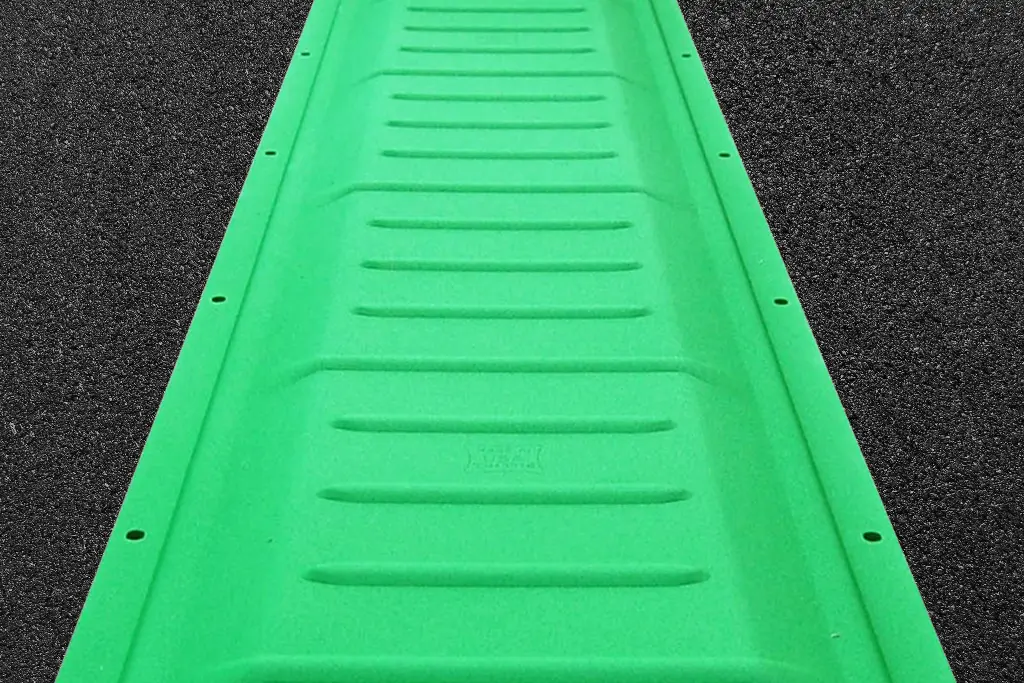



Define Boundaries with Tactile Warning Delineators
Define Boundaries with Tactile Warning Delineators
TufTile Tactile Warning Delineators (TWDs) are 12-inch-wide trapezoidal strips designed to alert pedestrians that a hazard exists at the same grade on the opposite side of a sidewalk or pedestrian access route, indicating that no crossing point is available along the length of the TWD. They are commonly used to define boundaries between sidewalks and separated bicycle lanes, between pedestrian access routes and shared street zones, and in quick-build sidewalk extensions. Made from durable 10-gauge G90 galvanized steel, TWDs are available in both wet-set and surface-applied installation options. A factory-applied powder-coated finish provides UV protection along with slip and abrasion resistance, and the low-profile design helps reduce tripping potential.
- 10-year performance warranty*
- Available in10-gauge G90 galvanized steel
- Wet-Set and Surface-Applied Installation Options
- Size: 12" x 60"
- Replaceable and Recyclable
- Meets Buy America Act 23 C.F.R. § 635.410
Available Colors
TufTile's in-house powder coating system with multi-stage wash, including a zirconium rinse, ensures superior bonding and adhesion of the final finish.
- UV stable finish will not crack, chip, peel, or fade
- Wet & dry slip-resistant surface
- Available in nine colors
- Custom colors available with MOQ
Documents

FAQs About Tactile Warning Delineators
Tactile warning delineators (TWDs) are used to define a boundary and alert pedestrians who are blind or have low vision to a same-grade hazard on the opposite side of a pedestrian route. They indicate that the adjacent area is not an intended crossing point along the length of the delineator.
TWDs can be particularly useful where pedestrian routes run directly alongside bicycle or vehicular areas without a traditional curb or other continuous physical separation.
Tactile warning delineators are typically installed where pedestrian routes need to be distinguished from adjacent same-grade bicycle or vehicular areas. Common applications include boundaries between sidewalks and separated bicycle lanes, pedestrian access routes and shared street zones, and quick-build sidewalk extensions.
The appropriate location and configuration depend on the pedestrian environment, adjacent hazards, project design, and applicable guidance.
TWDs, TDIs, and detectable warning surfaces serve different tactile functions. TWDs define boundaries and alert pedestrians to an adjacent same-grade hazard, TDIs provide directional guidance, and detectable warning surfaces use truncated domes to warn of designated hazards or transitions.
The three types of tactile walking surface indicators can work together to provide different types of information throughout an accessible pedestrian environment.
Yes. Tactile warning delineators can be used to help define the boundary between a pedestrian access route and an adjacent separated bicycle lane when the two facilities are at the same grade and lack a continuous vertical or horizontal separation.
TWDs communicate that the bicycle facility is on the opposite side of the delineator and that crossing is not intended along that portion of the pedestrian route.
TufTile tactile warning delineators are available in both wet-set and surface-applied configurations. Wet-set TWDs are installed with new concrete, while surface-applied TWDs can be installed over suitable existing cured surfaces.
TufTile TWDs are manufactured from 10-gauge G90 galvanized steel in 12-inch by 60-inch sections. Installers should follow TufTile’s current product-specific requirements for placement, fastening, sealing, and substrate preparation.

The EasyArc® Radius Calculator from TufTile quickly identifies the radius size closest to your project plans and creates a site-specific illustration with bill of materials.
Tiles and wedges are arranged side-by-side to form up to 20 radius configurations ranging from 9R to 70R. Don’t overcomplicate, just calculate with EasyArc.

- CHOOSE YOUR MATERIAL AND UNIT OF MEASUREMENT
- ENTER THE RADIUS [A] OR HEIGHT [B]
- ENTER THE CHORD [C] OR ARC [D] LENGTH